SelChat
Chats that keep up
Fast, crisp chats with voice notes, photos, videos, files, polls, locations and reactions. Reply, edit, pin, star, schedule and forward. Messages you send offline go out on their own when you reconnect.
SelChat brings your people together: private chats, big groups and channels, live voice rooms, HD video calls, live streams and stories. Built for Africa, it's light on data and keeps sending when the network drops.
From a quick voice note to a room of hundreds, SelChat has the right space for it.
Fast, crisp chats with voice notes, photos, videos, files, polls, locations and reactions. Reply, edit, pin, star, schedule and forward. Messages you send offline go out on their own when you reconnect.
Run big groups with admins, rules and join requests. Broadcast to followers with channels, and bring several groups together in a community. Invite anyone with a link or QR code.
Start a voice chat in any group and everyone sees it's live. Listeners raise a hand, and the host brings them up to speak.
Clear one-to-one voice and video calls, plus group video rooms for meetings, classes and catch-ups.
Stream to your followers and chat with them while you're live.
Share moments that disappear after 24 hours and see which friends are online right now, right at the top of your chats.
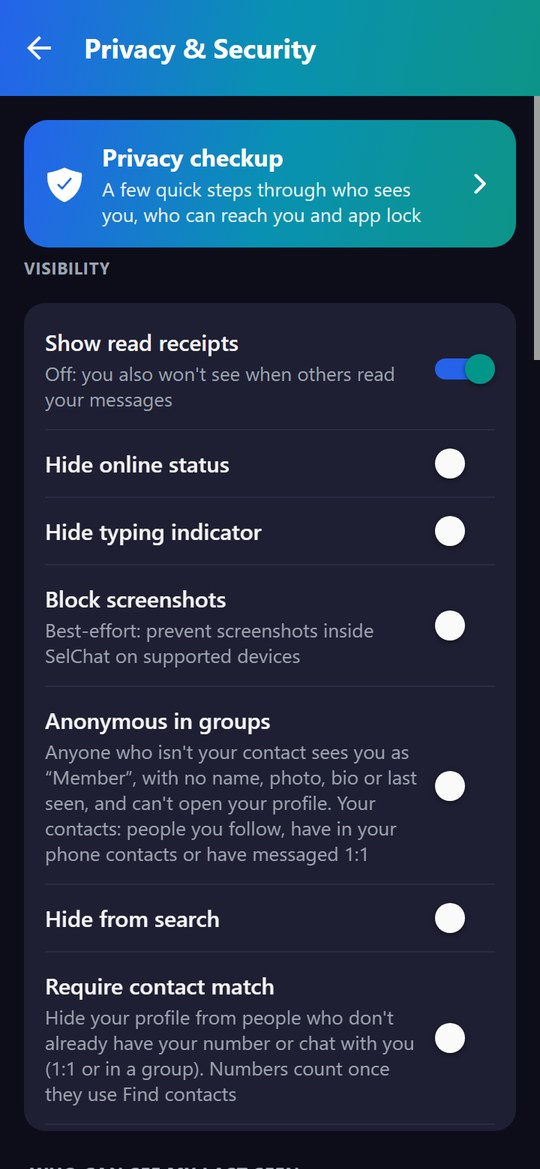
Hide your online status and last seen. Choose who can message you, call you or add you to groups, and block screenshots.
App lock with your fingerprint or face, two-step verification with recovery codes, and a list of every signed-in device that you can end with one tap. Block and report anyone.
Follow the people and creators you love, like their profiles, and get told the moment they go live.
Smart reply suggestions, low-data mode, chat folders, saved replies, wallpapers and dark mode.
See who's live at a glance. When a group starts a voice chat, it shows LIVE in everyone's chat list, with a bar at the top of the group to jump straight in.
Straight from the app: choose who can message you and what other people see.

One account on all your devices. Sign in with the same account everywhere.
The full app for Android phones.
SelChat as a desktop app on Windows 10 and 11. It also works on Mac and Linux.
The App Store version is on its way. You can use SelChat on your iPhone today:
Yes. Chatting, groups, calls, channels, voice rooms and live streams are all free. There's nothing to buy right now. Paid extras may come later, and they'll be optional.
Yes. SelChat is built for real-world networks. Messages you send with no signal wait on your phone and go out by themselves when you reconnect, and Low data mode cuts how much data media uses.
Download the APK from this page, open it, and tap Install. Android may ask you to allow installs from your browser the first time. Allow it for your browser only, then switch it back off if you like. Updates install over the top and keep your chats.
Yes. Open SelChat in Microsoft Edge or Google Chrome and click Install to add it to your Start menu as a desktop app. It works on Windows, Mac and Linux.
Turn on app lock with your fingerprint or face, add two-step verification with recovery codes, and check every device signed in to your account. You choose who can see your online status, photo, bio and phone number, and who can message, call or add you.
Yes. Chaos Clan is now called SelChat. It's the same app with a new name and a new look: your account, chats, groups and settings stay as they are, and the update installs over the old app.
SelChat is for adults: you must be 18 or older. When you create an account you agree to our Terms of Service, Privacy Policy, Community Guidelines, Account Suspension and Termination Policy and Disclaimer and Limitation of Liability. You can report anything that breaks the rules from inside the app, and all our policies are here to read.